

Android 17 marks another significant step forward for Google’s mobile operating system, introducing a mix of AI-powered tools and essential quality-of-life improvements. Announced during the dedicated Android Show ahead of the I/O developer conference, the update aims to make daily smartphone use smarter, more secure, and more expressive. Here’s a comprehensive look at the nine biggest new features coming to Android 17.
All-New Emoji
Google has completely redesigned all 4,000 emoji in Android 17, giving them a more three-dimensional, detailed appearance. The new designs add depth and shading, moving away from the flat, cartoonish style of previous versions. The updated emoji will first arrive on Pixel phones later this year, with broader rollout expected in subsequent months. This overhaul aligns with Google’s ongoing effort to modernize its visual language across platforms.
Pause Point
Digital wellbeing gets a clever new tool called Pause Point. Users can label certain apps as “distracting,” and whenever they try to open one, a 10-second timer appears. The timer offers breathing exercises or suggests switching to a more productive app. Users can set session timers, and turning off the feature requires a full phone restart, adding just enough friction to discourage mindless scrolling. This feature builds on earlier wellbeing efforts like Digital Wellbeing and Focus Mode, but with a gentler nudge rather than a hard block.
Screen Reactions
For content creators, Screen Reactions simplifies recording reaction videos. It captures both the selfie camera feed and the on-screen content simultaneously, displaying the user as a cutout overlay. Available on Pixel phones this summer, the feature aims to democratize video creation by reducing the need for separate recording setups. Users can record photos, videos, webpages, and more with just a few taps.
Even More AirDrop
Google expands Quick Share interoperability with Apple AirDrop beyond Pixel and Galaxy devices. Xiaomi, Honor, OnePlus, Oppo, and Vivo will gain support this year. For non-compatible phones, Quick Share now generates a QR code that iPhone users can scan to receive files via iCloud storage. Later in 2026, direct Quick Share and AirDrop integration will arrive in apps like WhatsApp, making cross-platform file sharing seamless. This move continues the trend toward breaking down platform barriers, following the initial AirDrop compatibility introduced in late 2025.
Easier Switching from iPhone
Google and Apple have collaborated to streamline the move from iPhone to Android. iOS 26.3 added support for wireless transfer of files, contacts, messages, homescreen layouts, and eSIMs, but the feature requires a compatible Android 17 device. Google confirms that support will finally launch this year, starting with Pixel and Galaxy phones. This addresses a long-standing pain point for users considering switching ecosystems.
Rambler (AI Dictation)
Under the “Gemini Intelligence” branding, Rambler is a smart real-time transcription tool that cuts filler words (“um,” “ah”), corrects errors, and condenses speech into concise messages. In demos, it accurately generated a shopping list, even omitting items when the speaker changed their mind mid-sentence. It supports multilingual dictation, switching between languages within the same message. Rambler will roll out to latest Samsung Galaxy and Google Pixel phones this summer. This feature represents Google’s answer to the growing demand for AI-assisted communication tools.
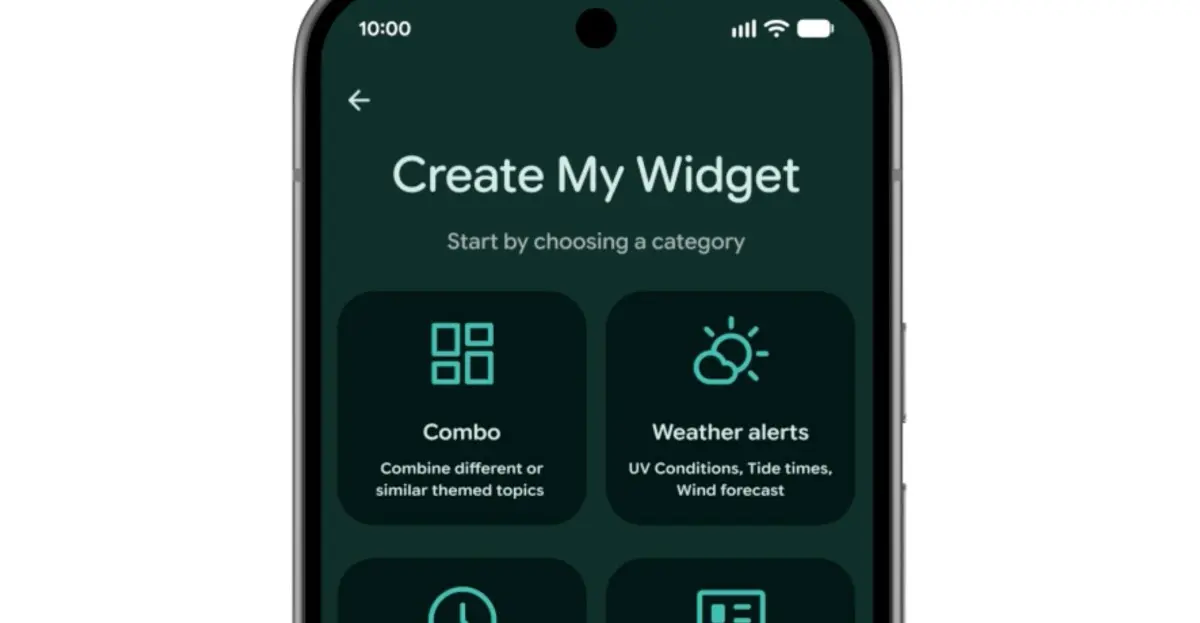
Create My Widget
Another Gemini Intelligence feature, Create My Widget, lets users build custom home screen widgets from natural language descriptions. Examples include a meal planner focusing on high-protein recipes, a weather widget for cyclists prioritizing wind and rain data, or a live concert feed from a local venue. This is Google’s take on the “vibe-coded” widgets popularized by Nothing, offering greater personalization without coding skills. It will arrive on select Galaxy and Pixel phones this summer.
Gemini Automation
AI automation extends beyond widgets. Task Automation, already available for food delivery and rideshare apps on flagship devices, expands to new apps. Gemini can order groceries from a shopping list or plan travel itineraries from photos. Chrome auto browse and other AI enhancements come to Android in late June, while Gemini appears in Autofill to speed up form completion. These updates consolidate Google’s vision of an AI co-pilot that anticipates user needs.
More Security Features
Android 17 includes a suite of security improvements. A collaboration with banks blocks calls spoofing their numbers, but requires the banking app installed. Improved malware detection monitors app behavior for suspicious activities like SMS forwarding or background launching. Chrome’s safe browsing mode scans APK downloads for malware. Additionally, anti-theft protections allow remote biometric locking via Find Hub and increase PIN attempt delays. These measures reflect growing concerns over scams and device theft.
Beyond these nine highlights, Android 17 brings many smaller refinements: performance optimizations, updated privacy controls, and deeper integration with Google’s ecosystem. The update reaffirms Android’s commitment to blending AI innovation with practical, everyday usability. As the platform evolves, features like Pause Point and Rambler demonstrate how software can subtly guide behavior while empowering users. With wider AirDrop compatibility and easier iPhone switching, Android 17 also breaks down barriers, making the OS more accessible than ever. The rollout begins with Pixel phones later this year, followed by other manufacturers. Stay tuned for hands-on impressions as the update lands on devices worldwide.
Source: The Verge News